Landisk Howto fix the device after a failing upgrade
October 25, 2006
Some users mail me with the question that their LANDRIVE (CHD3LAN, or any other typenumber) is not accessible anymore after the firmware upgrade and/or upgrade of the bootloader.
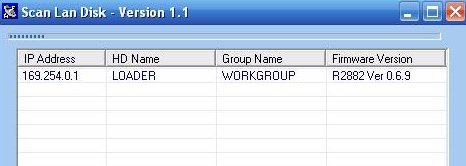
Uploading the kernel/web interface does not work or is not possible anymore as the webinterface is not accessible anymore. After a reboot / restart the quick configuration tool still is showing (or even maybe not) that there is a bootloader available (see image above).
To get the LANDRIVE (CHD3LAN) workable again you need to start with following: make sure your IP address of your PC is in the same range as the device: 169.254.0.2. Even if you do not see the loader running: the IP address you can access the device is 169.254.0.2. DO NOT USE a router but connect the LANDRIVE device directly to your PC LAN Card.
If you do not do this and you try go upgrade you will get an error message telling you that “subnet differ, connection fail”
As the loader in this example is running you only need to upload KERNEL+WEB interface to the device.
Use TFTP for this and the commandline will be: TFTP.EXE -i 169.254.0.1 put conceptronic45e-web.bin
the kernel and webinterface will be uploaded through the tftp protocol. After this fast upload wait 1 or 2 minutes. The device (at least the Conceptronic one) is restarting itself. With the Quick upgrade tool you can follow the bootprocess. Finally you will see the kernel NAS-BASIC45 running again.
If you do not see the loader running at 169.254.0.1 you can (or maybe have to)Â use the MT.EXE tool
Use the MT.EXE tool (available in one of my packages / folder), make sure the target is directed to 169.254.0.1 and upload the bootloader file rom125_2m.bin to it. It’s possible that you will see some wierd messages, upgrade ok, error etc.. but my opinion is that if your IP is in the same IP range the bootloader can be upgraded, you can check with the Quick Upgrade tool the status again. In all circumstances: DO NOT turn off the device within 1 minute.
When upgrading with the Quick Upgrade tool: wait until the program tells you the upgrade was a success or it was failed. The program will always end. Do not force it to stop.
Maybe this howto needs to be changed / adjusted a little: drop your comments ..


Dennis Slagers, just a guy from Holland


October 25th, 2006 at 8:59 pm
Wow thanks you just saved my harddisk :)
October 25th, 2006 at 11:24 pm
Thanks !!!
November 2nd, 2006 at 8:51 am
I think I’ve brick’d mine. :( I’ve tried all three utilities and they cannot find my landrive. I’ve even set my IP address to be 169.254.0.2 in hopes to get it to talk to my landrive to no avail. I did follow the instructions on connecting them directly together via ethernet. When using the MT tool and setting the MAC and IP addresses I get a “recevfrom error 10060″ and a “Config set fail!” error. :(
Any hints or do I have shiny new brick on my hand?
Thanks.
November 2nd, 2006 at 10:33 am
uhm .. config set fail? that looks like incorrect usage of mt.exe
what options did you set for the config mt tool?
you only need to add the IP address and add the firmware file name.. that’s it.
November 2nd, 2006 at 3:34 pm
All I did was run the mt.exe executable. I fill in the option to set the IP address and for the MAC address. I’ve tried both the 169.254.0.1 IP address and the static IP address that I’ve assigned to the drive. For the MAC address I use the address that is written on the back of the drive. For the firmware, I use the supplied firmware .bin file. The ping option doesn’t work either.
I thought it was pretty straight forward myself.
Anyway, the problem all started when I was updating the firmware. My Landrive is running extremely slow. I’m talking so slow, that the web interface takes a good 5-10 minutes for it to show up! When I was updating the bootloader firmware via the web interface, it ran for a good 15 minutes and nothing happened. I guess that’s where the problem is?
LaterZ!
Darren!!
November 2nd, 2006 at 8:28 pm
just remove the mac address and only use 169.254.0.1 and the firmware file
November 3rd, 2006 at 2:12 am
:( Still no worky. I think I brick’d it. I saw in this entry http://www.aroundmyroom.com/2006/09/20/nas-basic45-landisk-rdc2882/ that you can replace the EEPROM? I guess it’s probably too much work eh? I’m all the way on the West Coast of Canada and you’re somewhere in Europe.
LaterZ!
Darren!!
November 11th, 2006 at 7:46 am
Great problems here, help needed…
My Landisk stop working via net connection even if on usb works fine. It seems it doesn’t respond anymore to the standard IP, neither works as DHCP, the only way to ping it is attaching to my lan router that give it an ip addres via dhcp. This way i can ping it but i can’t reload the firmware anymore. Using MT, TFTP, Quickupdate i got several error, as “recevfrom error 10060″ and a “Config set fail!â€, but no way to get it back again. With landisk wtools i can’t see it even if mt ping it.
Thanxs in advance, Eriberto
November 12th, 2006 at 8:16 pm
Thanks for this guide.
I had a failure when uploading rom100_2m.bin by quick_upgrade.exe tool. I didn’t have any notice about the “wait for 1 minute” and when the msgbox said “Reboot”, I powered it off and on after few seconds.
Now my landrive IS NOT SEEN any more on the network, and my router only sees a fake Mac address like this: 06:07:08:09:0a:0b
Even using the scan software I can’t see any LOADER anywhere.
Do you think I could recover my device by the MT procedure above, even I haven’t accomplished to the law “In all circumstances: DO NOT turn off the device within 1 minute.” ???
Thanks for any further help
Val3r10.
November 12th, 2006 at 9:48 pm
By the way also my Landisk seems having a strange mac address:
00:0b:b4:00:00:02 instead of 00 14 34 A0 4E 46… even if my router see it as Storage, as it should be…
Another TFTP program tell me that seems that Landisk doesn’t answer to TFTP requests …
Any help appreciated thanks in advance for your support ad blog.
Eriberto
November 12th, 2006 at 10:28 pm
Gotcha!
Eriberto, I guess we share the same problem (besides the same country ;-p), btw I DID MANAGE TO SOLVE the blanked out mac (similar to yours) following the MT.EXE procedure above.
This is what I did right now:
- Downloaded all the needed stuff from the linked site
- Unlinked my pc from internet
- Changed the ip address to 169.254.0.2
- Directly connected via a plain cable the landrive
- Started MT app
at first, it didn’t see anything and always got errors.
But, configuring the plain text interface with the working mac address (there’s a tag inside the box), the above bin file and checking the target ip, FINALLY managed to program “A”(All) and the device responded.
Since then, I restarted and uploaded latest loader and firmware. Now it’s up & running with BootLoader v0.70 and firmware BASIC 46
And I’m very happy and grateful to this site for helping me to recover my NAS :-)
Thanks!
November 13th, 2006 at 6:49 am
Val3r10, great to read that the steps worked.
Please note that the V.70 and Basic46 is not yet supported by me nor ever will. This version seems only to be built for one special customer (RDC is telling). Other vendor(s) are still stuck for 069 and basic46
But I’m lucky the device is answering again.
Looks like the thing on Mars ;-)
November 13th, 2006 at 7:37 am
Just a question, my english is no to good:
With MT do i have to config the original mac address of my landisk or the one i discovered that now it seems to have?
More easy the n1 or the n2 of my comment above?
Thanks a lot it seems that a way to get it back is found…
November 13th, 2006 at 1:10 pm
mac address is not necessary.
only the IP address 169.254.0.1 and the firmware name
November 13th, 2006 at 2:16 pm
If MAC ADDRESS doesn’t matter then the procedure doesn’t work on my Landrive, already tested all this above, without mac address, a lot of time and nothing works…
;O(
really sad…
thanx anyway, any more ideas?
Eriberto
November 13th, 2006 at 10:09 pm
Dennis
As the guru on these NAS drives, can you tell me if the firmware can be upgraded to include a webserver? Just discovered I’m gonna need a basic webserver and don’t want to buy a new fancy NAS for it!
Thanks
November 14th, 2006 at 6:39 am
nope Methanoid. Not possible. The device has a very tiny http server itself to serve the GUI. That is it. There is no way to upload additional services. There is no memory for it.
November 26th, 2006 at 10:57 am
I just made a mini how-to about Landisk.
I can send you, give me an e-mail, and if you want you can hang on your web.
od1sea
December 2nd, 2006 at 8:05 pm
Dear Dennis,
You just maked my DAY ! Yes I lossed too my software on the CHD3LAN (oeps for the second time!).
First machine returned to reseller and got a replacement.
On the second CHD3LAN also lossed my software (seems that the utils from Conceptronic do not proper work with my network-configuration). After searching the Internet I read your work-around and it saved my machine and my mood!
Thanks for the good work on this!
You are the first MAN who is making me happy!
HAsta la pasta
Hans
December 2nd, 2006 at 10:03 pm
@Hans, the utils of conceptronic = utils of Dennis = same
;-)
December 3rd, 2006 at 2:46 pm
Hello,
I’ve got 2 landisks. One landisk I successfully upgraded, but the other one failed.
The quick_upgrade tool failed with an error.
In the scan I see the landisk with ip adres and a nas-basic version43, but I cannot login anymore and I don’t have a webinterface. I tried everything, but the MT tool always respond with recvfrom error 10054.
The ip address is 169.254.0.1.
The USB connection still works.
What can I do.
December 3rd, 2006 at 3:00 pm
if you do not have a webinterface anymore but you can still see the landisk with ip address, than the only thing you need to do is use the tftp option as described
MT you only use when having issues with the loader
December 4th, 2006 at 8:44 am
The tftp sollution is also not working. The tftp app. returns with a time out.
Also the login is not working. If you want to login I get instead of NetDisk as header a long string with a strange character.
December 13th, 2006 at 10:12 am
Are there still any ideas what to do with my problem or should I replace my landisk?
December 13th, 2006 at 3:07 pm
I think an upgrade with tftp must work as the loader is working
but otherwise: yeah returning is an options
January 1st, 2007 at 10:45 pm
Thanks alot for this page, after trying out all day(day new year day 2007)I managed to fix my (firmware failed)landisk.
after the firmware update with mt.exe i ran quick upgrade pointing to my .bin file.
Thank you all
January 5th, 2007 at 12:52 am
Dear Dennis,
I have a problem with failed firmware too on my landisk.
I tried fix it with utils mt and tftp, but without success.
Is it very strange - I can ping landisk (IP 169.254.0.1) only on short time (~1 sec.) after switch on. Then I don´t see it via Network. Landisk working via USB OK.
During my tests fix it with tool mt.exe, I received configuration (”Firmware version R2882 ver 0.6.9.”) - but only with hint (shortly after switching on).
I tried write firmware (only loader, Web-kernel, Web-kernel-loader) and sometimes I received message that upload succesfully, but after waiting - not solved.
Otherwise I received error 10060.
Can somebody give me any advice?
January 13th, 2007 at 11:44 am
rudku,
You have same symptoms as i had.
You can see how i solve it at
http://www.aroundmyroom.com/2006/11/26/landisk-how-to-fix-a-bricked-landrive-alternative-style/#comments
luck
March 17th, 2007 at 5:04 pm
Thannnnks. I thought all was lost…but…. :-)
March 20th, 2007 at 10:16 am
Thanks heaps… saved my day after a failed upgrade :)
March 31st, 2007 at 6:58 pm
Hi Denis
I have many Problems with my LANSERVER. After I tried different combinations with loaders and firmware I use Loader 67 and Firmware 47 as recommended by the suplier. However Filetransfer does not work reliable - some files are corrupted. A verify with my backup SW shows failure at the transmitted files. MT.exe reports error messages after transmit and I cannot see the device with quick_upgrade or landisk_wtools. Nevertheless I can open the webinterface and log in. USB works properly.
What shall I do?
April 1st, 2007 at 5:11 pm
may be you must use other network cable.
April 1st, 2007 at 5:54 pm
Hi Dennis,
I had some problems with upgrading my firmware. The original firmware was 28. I tried to update to 45, which failed. With the recovery method I was able to install ver. 32 and afterwards 45 loader 70. But my my HD was not recognized by the lan drive firmware (USB worked, but in the Web-Admin thingy said no HD)…
To solve the problem I upgraded to 47 which failed. No I dont have any access (neither LAN nor USB). Ping does not work, trying all combinations of 169.254.0.1 and my statically assigend IP… No response, not even in the first 2 seconds. Mt.exe does not seem to help either. Any idea? Is there a way to recover my LD? You said something about changing the EPROM? Or is it possible to flash the EPROM with the internal conector (con1)?
I am desperate for any advice!
Thanks,
Bombenschorsch
April 6th, 2007 at 9:04 pm
Hi Dennis,
As all the other people, I have had some problems upgrading my firmaware, and searching I have found your comments.
Thank you very much to save my network disk (and thank you to Internet to do this possible)!
Pingu
April 9th, 2007 at 6:43 pm
Hoi bombenschorsch,
I got the same problem you do I think.which RDC chipset do you have?
May 18th, 2007 at 11:34 pm
Hi Dennis,
my Firmware is Damaged and i get no connection in the correct Ip-Range.
Network is not connected.
How can i reset the Hardware..?
May 19th, 2007 at 9:07 am
I believe you can find enough leads about fixing your landrive by following the information. First change your PC in the correct IP range.
October 15th, 2007 at 2:05 am
I tried the procedure (MT application) but didn’t work, the Landrive was still in a coma status! What finally worked for me was to use the MT.exe application, but I uploaded what was the most recent firmware at that time: BasicNAS-48-b1-F version…
November 2nd, 2007 at 3:21 pm
[...] I messed up my landrive that I just bought, but then I found a very easy solution to that. See this page for the solution in case you experience the same. You can also check here for additional files, etc [...]
November 2nd, 2007 at 3:25 pm
was getting ready to throw the device that I just received today. Then wanted to make a google search when I saw the unit was detected in the Landisk scan tool. Found your website and got the device working again in a few minutes.
Thank you a lot!
December 18th, 2007 at 4:41 pm
Hi,
The Landisk is working with ftp, smb and I can mp the disk.
The usb2 however is not.
I tried a direct connection with usb2 to my windows xpHE laptop, waited and expected to see the windowns new hardware found, nope! not at all! notjhing! not a sign of anything attached at all!
Any ideas proff…. BTW Its driving me crazy….. I did see that the usb might need to be changed to become the master drive. But have no idea what that means nor how to do it..
Hours of research, yet all I gain is a bump on my head!
Thanks in advance for your kind help
December 31st, 2007 at 11:49 pm
Thanks so much. I finally fixed my unit after 1 year
February 9th, 2008 at 1:24 am
Narfing lan drive. It did work, but always disconnected so needed a reboot. Fiddled with the reset button and now nothing. Nothing usb, nothing eithernet, nothing 169.254.0.1 nothing nothing. Dead.
Help
March 7th, 2008 at 12:50 pm
I can’t access trought LAN, but the USB conection works fine. when I send a ping to 169.254.0.1 I don’t have any response. The TFTP tool don’t work (time out) and MT.EXE bring me several erros and then quit. I tried to rescue my NAS several times with no response.
The PC IP: 169.254.0.2/27
LAN: plugged
USB: Unplugged
Do you have any idea for rescue my LAN conection?
Thank you.
Paloke
April 1st, 2008 at 8:30 pm
Thanks Very Much it worked a treat. My Landisk wasnt showing in the quickupgrade tool so i ran mt.exe and then tftp examples and now i have lan function and usb back.
I thought i had bricked it.
April 5th, 2008 at 4:02 am
can it support landiskpro ?
I using Landisk Pro, but wrong upgrade landisk fireware v0.90, it show successfull.
after reboot, Everything gone.
I try use tftp to put the correct firmware, but fail.
pls help !, thanks a lot.
April 11th, 2008 at 5:57 pm
I tried to upload (maybe) a wrong firmware and I have crashed my lan disk.
Following your instructions I can ping my landisk at 169.254.0.1 ok
My pc is 169.254.0.2
But trying to upload the loader with MT.EXE I get the following error:
upgrade fail!!!, please please any key….
whatever I have tried nothing works.
when I click 6 (Reset to default configuration) :
recvfrom error 10060
retry…recvfrom error 10060
retry…Config set fail!
Reset target (7) gives the same error.
With ftp :
TFTP.EXE -i 169.254.0.1 put Conceptronic45e-69.bin
Error on server : Incorrect file format
Is there something else I should do ?
My landisk is ViPower VPA-3528Net
Thank you
Dimitris
April 12th, 2008 at 7:42 pm
I reply to my own question.
I was trying to upload wrong firmware.
I uploaded using tftp the file rom125_2m.bin and after that FirmwareBasicNAS.bin that is version28. (was the original firmware my device had)
I try the same procedure to load a newer version with no luck.
Any help ?
Dimitris