Archive for May, 2009:

Looking for a Linux script(er)

Written on May 30th, 2009 by Dennis7 shouts

I’m looking for someone who is able to create a simple script

it must be able to download nzb files from a rss feed like feeds from tvnzb.com (or from other sites around)

with options like: download files start with harpers+island with x264 in the filename or 720p etc.. so that in this situation something like Harpers.Island.S01E07.720p.HDTV.X264-DIMENSION would be downloaded. In this situation nzbfiles matching certain criteria will be auto-downloaded and put in a folder.
I used TV NZB Reader already but that one is for Windows and I want to use it on the Conceptronic CH3SNAS device

So if anyone likes this … Please help me! ;-)
Full Story » Filed under Life Tags:, ,

CH3SNAS: 1.05.b05 – fixing functions working in the past

Written on May 28th, 2009 by Dennis75 shouts

After the latest release of 1.05.b04 I received a few e-mails of users telling that certain options did not work as expected
So we checked the submitted issues and today we release 1.05.b05

Release Notes

  • UPnP Server does not allow single quote ‘ in foldernames: fixed
  • Special character like ! in password could not be used anymore: fixed

Download the 1.05b05 here

if all goes well this release will be available as official download from the conceptronic.net site next week.

Message to self: compiling nzbget

Written on May 27th, 2009 by Dennisno shouts

Compiling NZBGET at CH3SNAS with Fun_Plug 0.5 with libpar2 & libsigc++ (make sure you have installed all the Fun_Plug packages for compiling programs (gcc / uclibc)

Download svn onto CH3SNAS use for configure: (check nzbget.sourceforge.net)

./configure –disable-tls –without-tlslib –with-libpar2-libraries=/ffp/lib –with-libsigc-libraries=/ffp/bin

TLS seems not to able to compile due to missing library (check this!) therefore disable it in configure. Configure line must be correct otherwise somewhere during the make you get a segmentation fault (ParChecker.o)

libpar2 and libsigc needs to be statically compiled cause on not every system the tools are available (make it easy). I am lucky to have the tools installed on one device ;-)

after the configure you can use the command ‘make’

If you want the packages: libpar2 & libsigc++ install with funpkg -i [package-name] than you can compile it yourself as well (statically or dynamically is possible if you download the 2 packages)

Finally after the make you must use the following command to statically put the 2 libraries into the nzbget binary

g++  -g -Wall  -lxml2 -L/ffp/lib -L/ffp/lib -rdynamic -o nzbget  ArticleDownloader.o BinRpc.o ColoredFrontend.o Connection.o Decoder.o DiskState.o DownloadInfo.o Frontend.o Log.o LoggableFrontend.o NCursesFrontend.o NNTPConnection.o NZBFile.o NetAddress.o NewsServer.o Observer.o Options.o ParChecker.o PrePostProcessor.o QueueCoordinator.o QueueEditor.o RemoteClient.o RemoteServer.o Scheduler.o ScriptController.o ServerPool.o Thread.o Util.o XmlRpc.o nzbget.o svn_version.o  -lncurses -lpthread  /ffp/lib/libpar2.a /ffp/lib/libsigc-2.0.a

if using tls above g++ line must be getting ‘TLS.o’ and -lgnutls

Ready set and go and do not forget to use the updated nzbget.conf.example as well.
– end of message to self

CFULLHDMA(i) beta firmware 1.17.22 – 1.17.19

Written on May 27th, 2009 by Dennis5 shouts

Available for subscribed beta testers:

  • Fixed: System hang when playing video files and pause for several minutes (change kernel memory size)
  • Fixed: photo thumbnail mode crash sometimes
  • Fixed: photo exif information not cleaned when in slideshow
  • Fixed: MPEG2 has no sound at S/PDIFF option off
  • Improved: Speed up Network share searching time when switch network
  • Removed: S/N Display from version page
  • Fixed: network cable unplug crash when playing youtube stream
  • Fixed: some MKV files skips and drops audio with DTS Passthrough
  • Fixed: playing the same song over and over when Music Auto Play is set to repeat
  • Added: Conceptronic recommends in iMedia for CFULLHDMAi
  •  Temporarily broken: some streaming media through imedia. Several services do not work as expected in this beta. Main focus of this release is to get feedback about the pause issue reported by many testers.

Please submit your feedback! firmware version ONLY available for beta testers already subscribed.

Fighting

Written on May 26th, 2009 by Dennisno shouts

Fighting to see the blog re-appear in Google. I have no clue why the wordpress blog does not show it’s new entries into the google search engine. Maybe some updates will trigger something and I’ll see my entries re-appear again. (I thought it was the sitemap issue, maybe it is and am I too impatient). ..

But finally I found out that one dude had access through a php script on my site and altered some header files and entered some keywords for old man in a encrypted script.
Uhmm killed what was left on that folder.

sitemap stuff

Written on May 26th, 2009 by Dennisno shouts

I noticed that the site was not indexed correctly anymore. A stupid plugin (old one) did not create the sitemap.xml correctly anymore. So searched a new plugin and now the website should be indexed correctly again. no idea if it will raise any hits ;l-)

Full Story » Filed under Weblog Tags:

Yuixx – CE 3100 – Streaming HD media Player / IPTV solution

Written on May 25th, 2009 by Dennis79 shouts

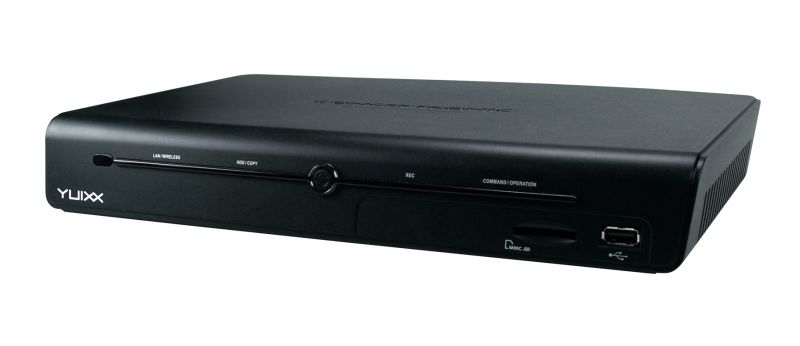
2L International & Metrological announced today in a press release the first ready-to-market streaming HD media Player / IPTV solution based on Intel(r) Media processor CE 3100 (Metrological press release including images can be found here)

yuixx-device

Involved in the project I can of course tell and show a little more than what the press release is announcing. In short: The device is focussing on HD content, streaming media and much more! I’m impressed about the quality of the Intel CE 3100 (aka Canmore SoC) which is totally different from all the solutions I have seen before and worked with. Yes it does 1080p at 1920*1080, it has HDMI 1.3a, Composite, Component, Stereo, S/PDIFF optical, USB at the back and USB at the front, SD/MMC cardreader and optional: smartcard reader & all kinds of Digital Tuner cards.

Last year Intel & Yahoo announced the availability of Widgets and they can be embedded as well. What to think about Twitter on your TV or Flickr or many other Widgets?

At birth the guys of Conceptronic gave the HD Media Player the name: YUIXX (pronounce as DJuukes as like jukebox)

As the framework can use up to four hardware optimised graphical layers with optional alpha layers the GUI can and will be an awesome experience.

gui_mainmenu

Of course I can reveal some other images as well which will give you a slight preview of the functionality

Discuss freely about the Yuixx in the forum. You can ask for features, functions, usability, GUI etc.. and where possible it will be used, considered, answered

NZBGET+WEB + UNPAK updated package

Written on May 22nd, 2009 by Dennis54 shouts

I’ve updated the nzbget + nzbgetweb +unpak.sh script with latest versions for the Conceptronic CH3SNAS:

  • NZBGet: NZBGet version 0.7.0-testing-r317
  • NZBGet Web Interface v 1.4 (testing-2)

the unpak script is little modified to fit the CH3SNAS configuration and has been changed to fit the config in NZBget Web when using the version 1.4 (testing-2).

Little How-To

Install Fun_Plug 0.5 of Fonz

Note: if you already run lighttpd you must make own adjustments to your lighttpd configuration and websettings

install the PHP package (needed for lighttpd).

  1. Download with wget http://www.aroundmyroom.com/ch3snas-funplug/php-5.2.6-3.tgz the PHP package (temporary from my server) as the new updated PHP version of Fonz seems to break something. Install PHP with ‘funpkg -i php-5.2.6-3.tgz’

Update: after consulting Fonz (Tobias) I learned that the new version of PHP is compiled with CURL support. So it’s necessary to install the curl package as well

  1. Download with wget http://www.aroundymyroom.com/ch3snas-funplug/unrar-3.7.8-1.tgz the UNRAR package. Install with ‘funpkg -i unrar-3.7.8-1.tgz’
  2. Download with wget http://www.aroundmyroom.com/ch3snas-funplug/nzbget-zeroday-web.tgz the NZBGet +NZBGet Web + Unpak package

put the tgz file in /mnt/HD_a2/ and untar this with tar -xvzf nzbget-zeroday-web.tgz and the files will be extracted to /mnt/HD_a2/newsbin/

start the webserver and nzbget with

  • sh /mnt/HD_a2/newsbin/startweb.sh start
  • sh /mnt/HD_a2/newsbin/startnzbget.sh start

The whole setup should not be accessible through http://Your-CH3SNAS:8000

Do not forget to configure your usenet server, username and password !!!

http://Your-CH3SNAS:8000/config.php?section=S-NEWS-SERVERS
If you want to upload nzb’s through the webinterface make sure that in the PHP.INI

upload_tmp_dir = /mnt/HD_a2/tmp

is enabled, and that the maximum allowed size for uploaded files is big enough.

upload_max_filesize = 256M

You can copy with

cp /ffp/etc/examples/php.ini-recommended /ffp/etc/php.ini

the correct php.ini into the correct folder

PC & Video Editing Software

Written on May 19th, 2009 by Dennis4 shouts

Can somebody advise me what kind of PC is suitable enough to edit MTS files (1080i full HD 1920*1080 stuff) and what software tool is advised. All kinds of suggestions is appreciated including the $$ it is costing. Thanks!

Full Story » Filed under Weblog Tags:

WolframAlpha seems to work

Written on May 17th, 2009 by Dennisno shouts

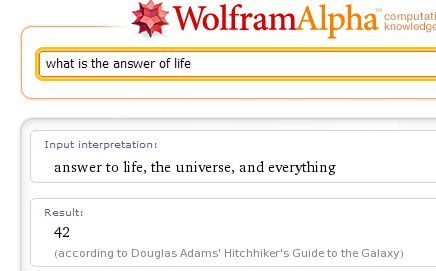
42

Yeah .. the answer about life … WolframAlpha Google killer? W’ll see ..