Posts Tagged ‘cfullhdma’
Fixed: NFS issue (could browse but not play)
Fixed: the crash issue when changing subtitles between SRT and IDX+SUB
Fixed: some .ts files not being played smoothly
Fixed: wrong time estimation on some mpegs
Fixed: Skip Vista 2nd login/password request
Fixed: cannot show subtitle file with multiple lines unicode
Fixed: AVI issue
Fixed: Some MKV files could not being able to be played
Fixed: UTF8 detection issue
Fixed: Playlist sorting issue
Fixed: DLNA mp3 ordering issue
Fixed: internet playlist crash issue
Fixed: some M-JPEG not to play issue (not all M-JPEGS can be supported)
Fixed: some TRP bug
Fixed: BIG5 samba share name not to work issue
Fixed: some subtitle crashed
Fixed: no saving when sub/lang toggle
Fixed: Picture Rotate issue
Fixed: DLNA total file number not to update issue in thumbnail mode
Fixed: UTF8 Greek subtitle issue
Added:Set the biggest font size to 102
Added: Support .smi subtitle
Added: Support MKV embedded subtitle changing font size, color, and position
Added: manual aspect ratio option for video
Changed BT engine as Transmission BT
Changed: the way Samba client was operated
Changed: Speed up the playback time
If the firmware is upgraded from v01.21, need to ResetToDefault to clear the bad BT setting file. Otherwise, BT won’t work untill ResetToDefault (CFULLHDMAi only)
As this is a really large update: reset to factory defaults after upgrading !
for the dart fans,
http://[ip-of-cfullhdma]:49152/web/IMedia
Make a channel ie. “Darts”
Than use this URL: http://www.garnierstreami…amerSelect.asp?stream=158
and enjoy the games on the CFULLHDMA(i) …… tadaahhh
Due to limited flash memory in CFULLHDMA some features cannot be implemented. As Flash for CFULLDHMAi is bigger some features will only be available for CFULLHDMAi.
- Fixed: CFULLHDMA: Â SUB/LANG hang issue (back to older setting)
- Fixed: Internet upgrade sometimes could hang sometimes
- Fixed: Turkish subtitles
- Fixed: avi av unsync issue when switching audio
- Fixed: some internet radio stations could hang when pressing back/stop
- Fixed: Added Support for undocumented E-AC3 audio
- Fixed: Disabled Pause function to avoid hang issue for M-JPEG
- Added: Update audio settings (CFULLHDMAi only)
- Fixed: S/PDFI as S/PDIFÂ
- Updated: some german text strings
- Updated: reset & reset imedia & youtube search string
Only available for beta testers.
Please reset to factory defaults to have the new firmware with the settings correctly applied.
note: it could be possible that the USBÂ upgrade seems to stall just before the screen blanks (5 second interval)
if the screen stalls (so it will not turn to the screen where the actuall progress is seen) it is probably due to the fact that some services like the UPnP server cannot be stopped. Please disconnect the LAN cable, restart the CFULLHDMA(i) and upgrade again.
The procedure for upgrading is:
the device will first load the whole firmware from USB disk into memory. Than all services will be stopped, TV screen will be turned off (no signal), than TV screen will be turned on again and the upgrade will start.
do not turn off the power during the 2nd sequence. Cause than you will brick your device.

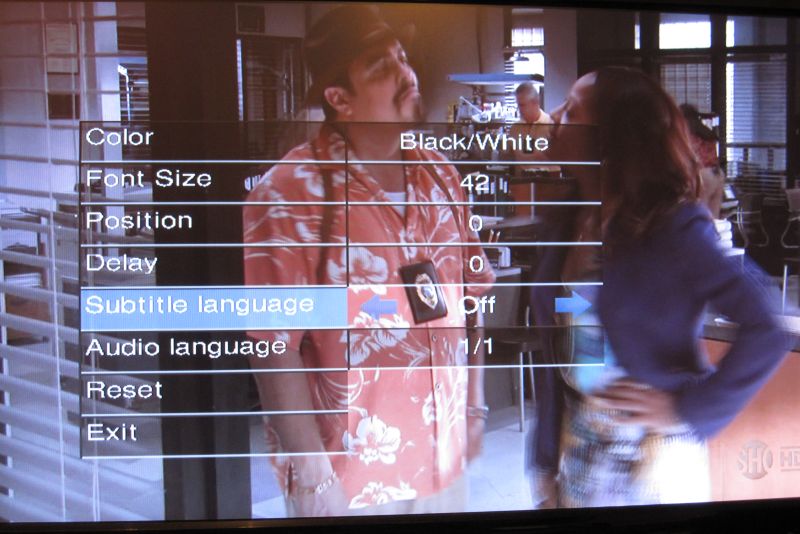
The new sub/lang feature in the CFULLHDMA(i) .. Tadaahh ..
Beta firmware version CFULLHDMA & CFULLHDMAi with a number of fixes and a new feature
v01.20.01
Fixed: Subtitle control page hang issue (it’s now clear what you select)
Fixed: palette bmp palette issue
Added: Support for *.trp video files
Fixed: picture crash
New Feature: support for the M-Jpeg codec for avi (oh yeah, many people will love this)
Link for download for beta testers will be made available later today, Next week official released through the internet upgrade.
CFULLHDMA 1.19.02 firmware released through the official internet upgrade functionality within the CFULLHDMA (USB package not available yet).
It’s a stable release with 1 major ‘new’ experimental feature for all users
but most of all: RANDOM MP3 Playback is possible right now. Press Repeat and you will see the function during playback music
and of course we fixed some items what was broken during the time 1.17.53 was available
Fixed: Youtube does not to play
Fixed: sub/idx hang
Fixed: ResetToDefault DTS option
Fixed: Photo display inform under slideshow
Fixed: bmp crash
v01.19.02
Released to beta testers:
Fixed: Youtube does not to play
Fixed: sub/idx hang
Fixed: ResetToDefault DTS option
Fixed: Photo display inform under slideshow
Fixed: bmp crash
Suprise: check the srt sub function pressing the sub key on the remote. Note: it will ONLY work on SRT files ! Embedded subs: no go ! and it is highly experimental, so some functions will not work as expected yet.
Damn, nu wilde ik de impact zien van de sonde op de Maan…. dus in 3 minuten voor alle CFULLHDMA(i) bezitters maar gauw even de Journaal24 stream beschikbaar gemaakt in ‘Conceptronic recommends’ …
Nu je dit leest denk je: da’s lekker nu pas melden .. Yep .. klopt, maar …. NOS Journaal 24 staat er nu wel ’standaard’Â als optie in de lijst. Hef Fun!
To be released as beta next week:
v01.18.06
- Fixed: duration issue on ts files
- Fixed: some ts files cannot play
- Fixed: LPCM crash issue
- Fixed: not able to stop when playing picture in slideshow mode
- Fixed: some JPEG could crash
- Fixed: MPEG1 Karaoke files could stutter
- Fixed: 1080p24 flicking issue
- Fixed: not to see embedded picture for mp3 files
- Fixed: TrueHD audio
- Fixed: HDMI TV output noise when selecting S/PDIF RAW to S/PDIF/RAW and S/PDIF&HDMI RAW
- Fixed: srt subtitles
- Fixed: some pictures thumbnail could not show correctlyÂ
- Updated: Speed up the playback time for video
- Add “most popular” &”most recent” and remove “most link” for Youtube
- Improve Youtube playing speed
- Improve JPEG color quality
v01.17.52
- New: Option to select Gigabit or 10/100Â Network speed. This should give positive effect on stability and heat.
- Fixed: Youtube cannot play anymore
Experimental: Add Samba Client manual input
1. username@password//server/share
2. //server/share
Note: samba link will be added under the main share like a shortcut. Function is not validated nor approved nor really functional yet. Very experimental.
- New: Support for MicroDVD .sub subtitle files
- Fixed: 1080p24 GUI flicker issueÂ
Find the new functions under the setup, advanced settings menu.
Older Posts »