Posts Tagged ‘landisk’
Please find in this entry the preview of the 1.03Final version just before it will be posted onto the official site at the end of this week. Somewhere next week (but I will not be here in Europe)
This 1.03Final (2nd version) will be exact the same version when published at the Conceptronic driver website
The reason why it’s published here is to get valuable feedback from early adaptors so that a certain unseen important bug can be noticed before.
Our first version was withdrawn due to a nasty bug mentioned by early adaptors: data transferred could get corrupted. After getting a fix, there were still some issues left (rename folders causing an error message and ssl ftp did not work anymore), so therefore it took more time to release the 1.03Final version than expected. S O R R Y.
In this release some new added features and fixes compared to previous 1.03 version.
- Fixed: formatting is stopping at 94%
- Fixed: DHCP server issue offering IP to client
- Fixed: Scan disk failure
- Change: Changing cramfs into SquashFS
- Added function:Â fun_plug does not work on sdb2 : Fixed.
- Fixed: data corruption (files getting bigger)Â when storing data with alternative tools (Total Commander etc).
- Added: PureFTPD supports SIZE and MDTMÂ
- Fixed: HDD1 unable to sleep in Raid1 mode
- Added Request : FTP Server support option -O : ftp logging
- Change: UPnP server: Refresh newly added files automatically,  so we removed the “Refresh” button and Auto Refresh Timer from the GUI. (enable / disable will re-index the total database) The database will not be updated when using FTP. This change will make the UPnP server run more stable.
- Added Request : PureFTPD supports SSL
- Added function:Â Scan Disk functionality
no guarantees & warranties ;-)
download here
Regarding RDC2882 V49 firmware for LANDISK devices
RDC is writing that it’s a beta test version and they did not ‘publish’ it to the public
The reason for the release is a problem in the SAMBA function in MAC OS 10.5.1 however it seems that in MAC forums people write that there is more or less a bug in 10.5.1
compatibility problem…..so, MAC OS released 10.5.2 version to solve this
It seems that the NAS-BASIC48 firmware is just working fine with the 10.5.2 and that is one of the main reason they did not release NAS-BASIC49
This would have been 1.03final if there was not found a nasty bug in the GUI where you are not able to modify a user. Reason:Â the apply button does not function, so here I present you: CH3SNAS 1.03b6Â CH3SNAS 1.03b6a firmware.
Known issue: users cannot be modified, must be deleted and recreated.
- Fixed: HDD cannot go into idle / sleep mode
- Fixed: GUI did not give ability to remove shares
- Added feature: support for Jumbo Frames .. change the MTU value from 3000~9000
- Added feature:Â Central European codepage support to FTP Server.
note: as the HDD’s will fall into standby / idle state it can take some time to start an FTP or other transfer setting as the HDD’s have to go into active state again (seems logical).
Although this firmware will not destroy your data: there is no guarantee of course .. it’s beta .. ;-)Â
Feedback is appreciated
the message created to trigger tweakers.
In some very rare conditions (I still did not found when and why) it’s possible that a RAID1 array made onto the CH3SNAS gets into a degraded status and even a reboot is not solving the issue.
How to get the RAID array fixed again?
First of all: make sure you have telnet running. Telnet can be installed by using one of the many fun_plugs around. So no explanation from me about that.
Login to the shell
first check the actual raid status:
 # cat /proc/mdstat
Normally you should get something like this:Â
Personalities : [linear] [raid0] [raid1]
md0 : active raid1 sda2[0] sdb2[1]
xxxxx blocks [2/2] [UU]
But when degraded the raid status shows: [_U] or [U_]
Do some debugging with the command:
# mdadm -D /dev/md0
This will show the actual HDD’s in the array. For the CH3SNAS it can be:
/dev/sda2 or /dev/sdb2 if one of the disks is not in the array anymore you have to add it manually by using the following command:
mdadm /dev/md0 -a [degraded hdd]
this is: /dev/sdb2 or /dev/sda2
System will report:Â
mdadm: hot added /dev/sdb2; and the array will be synced again (seen through webinterface or using the `# cat /proc/mdstat command`)
It took me some effort to get the fun_plug part working on the Conceptronic CH3WNAS, but after hours of testing I was able to create the correct files.
 

download the telnet package for the CH3WNAS
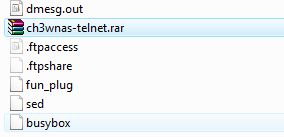
Copy the RAR file to the root of the harddisk and unpack the rar file also into the ‘root’ (ch3wnas\hdd_a [share]) of the device.
The files: fun_plug, sed and the busyboxy file will be available now. Reboot the device and telnet should be available.
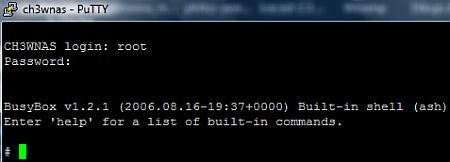
You have to login with the username: root with the password of the admin. If seeing the black screen as shown here: it’s working ..
Have fun ..
Why using telnet? For some: hacking is a way of life, but for me: if there are files you cannot modify / delete for what kind of reason: with the telnet session you can: rm [filename] -rf and ALL is removed (use it with caution, I do not guarantee the safety of your data, cause I do not own your backup) ;-)
b.t.w. no idea how stable it is .. I lost 2 times a connection with the device already .. a hard reboot was the only thing to get it alive again.
it could be possible that you get a black screen and cannot do anything: enter 5784468 and the screen will be unlocked
For those people with a RDC 2891 chipset LANDISK (low-cost)
I have managed to get a new kernel driver: kernel-s2891-010b1Â
There are no release-notes available yet, but I know for sure that a number of stability / compability issues are or will be solved. Just upgrade the file through the webinterface. Note: No warranties.
Note: this is NOT a kernel update for the RDC2882 chipset. Only for the RDC2891 chipset
Change-Notes
Fixed: Mac OS 10.5 support
Fixed: Mac OS 10.4.x support multi-folders.
Fixed: FileSystem Longname refine.
Add: UPNPAV support iRadio.
Add: HD volume set from web.
Okay, the guys from Conceptronic just released the 1.03b5 firmware as the feedback from customers was really helpful solving issues. Next to fixing 2 issues one wanted feature was added.
Fixed: RAID issueÂ
Raid roaming is not (yet) supported. Means that it’s not guaranteed that a Raid Array keeps existing after inserting the 2 HDD’s in another CH3SNAS box. I believe that to keep the array alive the other CH3SNAS must be configured to RAID1 already.
Fixed is the issue that trying above feature the RAID array in the original CH3SNAS was broken. When ftp was used wrong volume names and labels were used.
Added feature: FTP -H optionÂ
After our update of the FTP server to PureFTP we received reports from some users that they were not able to logon quickly (20 seconds or more waiting time).
We fixed this to add the -H option starting the ftp server (-H means that there will be no reverse DNS lookup)
Fixed: Restarting UPnP Server on DHCPÂ
Most debugging we did on the UPnP AV Server.Â
We discovered that when streaming data  to a mediaplayer at random times the stream was disconnected. Debugging showed that if the lease of the DHCP was ended the whole startup script was executed again causing the UPnP Server to be restarted as well. Especially when playing long MP3 files this issue was shown.
Please note that this issue was caused using DHCP. When using fixed IP this issue did not occur.
Update: wrong file added in the rar file :-( My Mistake.. It’s fixed now.
Download the beta 1.03b5 here
The filename inside must be refer to: CH3SNAS.1.03(1.33.1220.2007)
Just released by Conceptronic to some beta users new firmware for the Conceptronic CH3SNAS: 1.03beta 4
Release notes:
- Add a “skip” button to skip formatting of a HDD (to prevent data-loss by formatting wrong disk)
- Power Management : add 60 and 120 mins options.
- EasySearch Utility : Add “IP Address” as a mapping method instead of just using “sharename”.
- FTP Server : fixed no login pop-up window appears when using a non-Anonymous account to login to Server.
- Moving drives from one unit to the unit, no reformatting is needed (Hell who has more than one (euh .. I ?)
Download here the Beta4 firmware & Download here the new Easy Search Tool
Does it fix the UPnP disconnect / restart issue: No. I was able to reproduce the issue again. My idea is that it has to do with DHCP, Routing and DNS. A fixed IP address on all items in the network could solve the issue (I think, but who am I?) ..
” Volgens dinges van die rondzijnkamer blog is alleen het jasje gewijzigd en niet de hardware. ” [over: de Conceptronic CH3SNAS)
enige wat aan hardware gewijzigd is, is de wijze waarop de HDD's weer uit de Black Box gehaald kan worden. [TWEAKERS]
Just before the black box is hitting the shelves.Â
Today a new firmware was released to some beta users .. 1.03beta 2
update: firmware withdrawn, version 1.03abeta 2 had issue that UPnP server did not start. New Version released!
release notes:
1. Users with RAID1 configuration could loose their data after the reboot of upgrade 1.02 to 1.03beta1. The device was asking if you want to re-format the device. Removing the HDD’s and restart the device empty could save the data, but some users were pig-headed and lost all their data. Some RAID parameter were wrong causing this issue. It’s fixed now.
Password courrupted : user’s password could get corrupted after changing. We fixed that also.
« Newer Posts —
Older Posts »