This posts is merely an overview of what I did to get my WLAN guests, who access the Internet through the hotspot feature of the USG and the Unifi controller,through a VLAN so that they are not part of my own private network. (security)
This handout only applies when you own some gear of Ubiquity. (I have also other hardware, here you might have to make some configuration as well, my situation is explained.
What hardware is in the network
USG Router – US 8-150W switch – AC-Pro, 2 x AC-Lite AccessPoint (Unifi stuff)
1x TP-Link TLSG108E (Smart Switch)
2x Dump switch 5 port Netgear (not important in this story)
1x TP-Link TLSG2216 (Smart Switch)
1st Create a guest network with VLAN100. Do this only if you have the USG. If you do not have an USG this does not apply cause the network part in the controller is for use with the Unifi USG router.
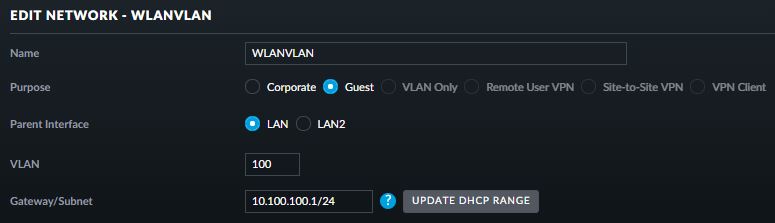
If you use “Guest” it is already isolated from your corporate LAN.
Modify other settings like DHCP in this menu. This I do not explain.
Now make sure your SSID for your guests can be on a VLAN
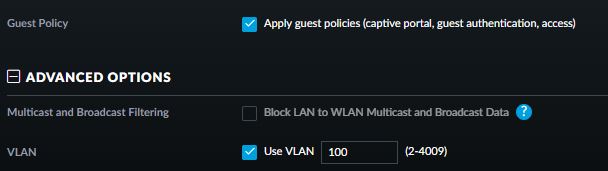
This is the most important part.
Notice: I have an US-8-150W. When creating a VLAN Guest network in the profiles part of the controller the ports will be configured automatically. As long as you have all profiles accepted on the ports, the VLAN will directly work if your AccessPoint is directly connected to the Unifi Switch.
In my situation I have 2 AccessPoints behind a smart switch and 1 AccessPoint connected to a dumb switch what is connected to the US-8-150W (all devices eventually come to the US-8-150W as the uplink is the USG Router).
A simple test towards the AP connected to the dumpswitch is showing that the VLAN is working
To have the VLAN100 working towards the other APs you need to tag the ports in other smart swiches. In my situation 2 different TP-Link devices
Tips for the TP-Link: TLSG108E: enable 802.1Q (no need to set the 802.1Q PVID setting)
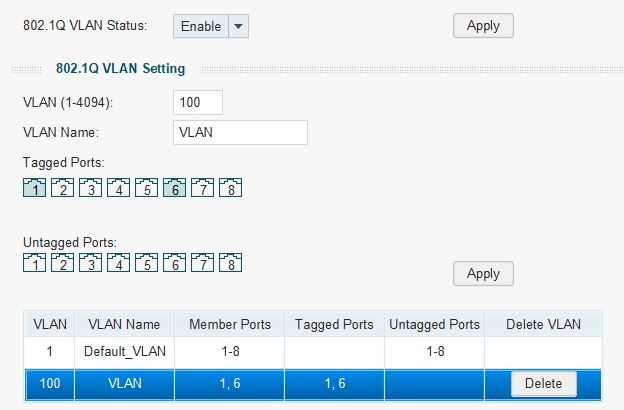
In my example you see that port 1 and port 6 are tagged with VLAN 100. Port 1 is the uplink port towards the other switch (the unifi switch) and port 6 is the port towards the AccessPoint
Apply and save the configuration and your guests can access the guest portal over VLAN
the TP-Link SG2216 is a business smart switch so the screens are a little different
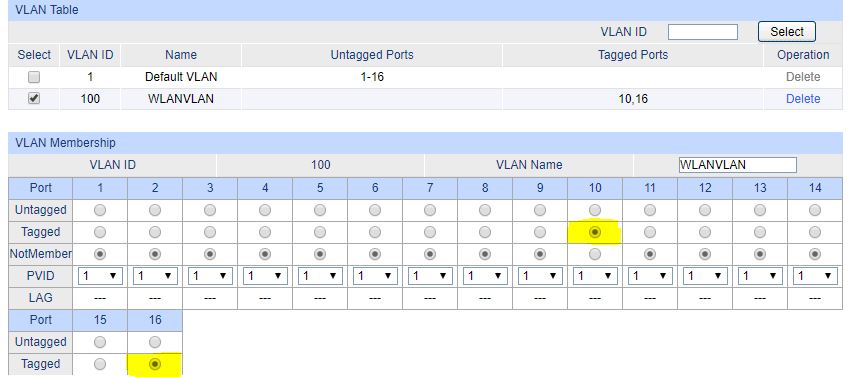
Here you see the VLAN section of the SG2216 where I tagged port 16 (uplink port towards the Unifi Switch) and port 10 connected to the AccessPoint. Now this AccessPoint is also serving VLAN towards my Guests.
Maybe you wonder what will happen to your normal LAN clients when you enable or tag ports on VLAN100: your normal LAN is not tagged and the switches will forward your data normally.